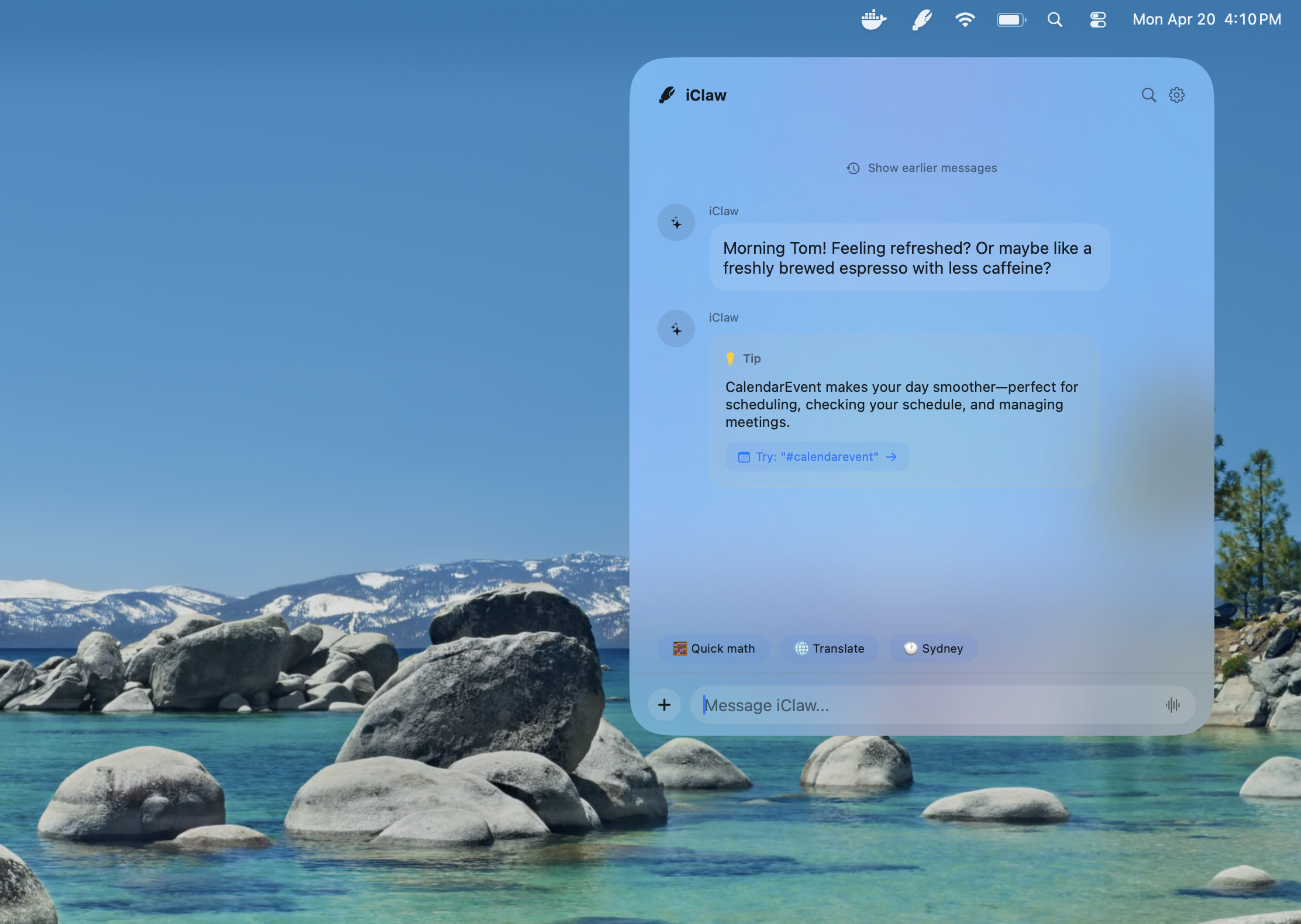
I recently shared Junco, an on-device AI agent that uses Apple Intelligence to write and edit Swift code. Today I’m sharing iClaw, an experimental local AI agent for macOS designed around safety and privacy.
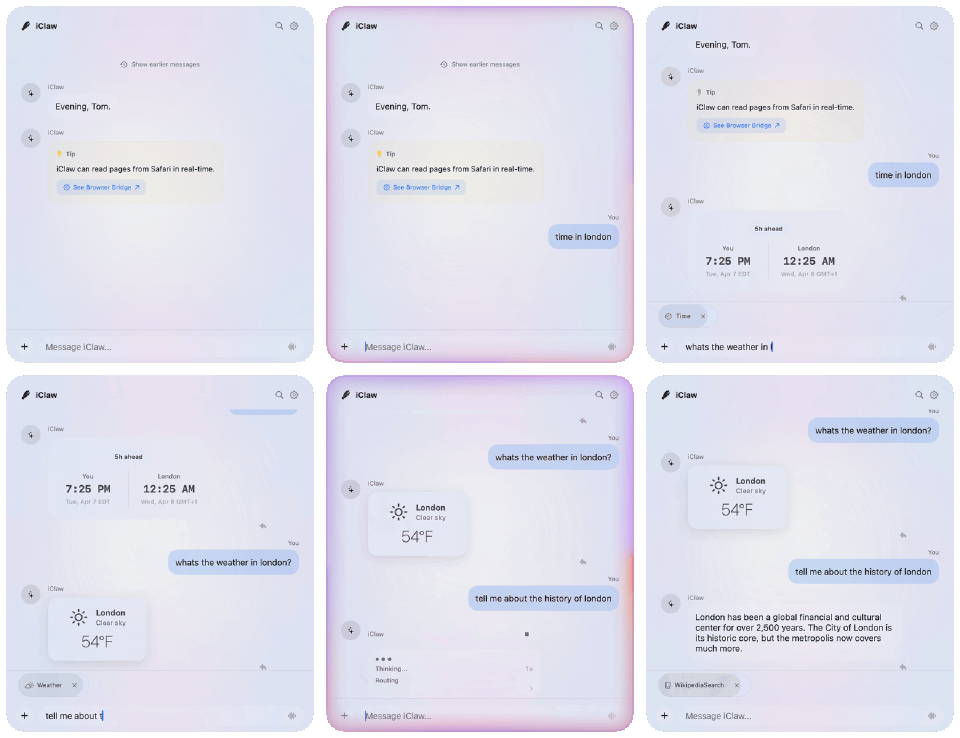
iClaw started as a SundAI hackathon project in March. Although our demo failed, we learned many lessons I’ll share. But first:
Why Build iClaw? #
Technologies like OpenClaw are transformative, and while it’s among the fastest-growing GitHub repositories, it hasn’t crossed the chasm into mainstream use. I suspect non-technical users lack the time, knowledge, patience, and risk appetite to purchase a Mac Mini and AI credits, configure agents, and give them access to their personal accounts.
iClaw is fundamentally different. It’s designed to use the AI you already have (Apple Intelligence), without buying credits or a subscription. Built inside Apple’s App Sandbox, iClaw focuses on safety, security, and privacy: it only accesses files, data, and accounts you give it explicit permission to. As a bonus, on-device AI is green—using orders of magnitude less energy than frontier data centers.
What can iClaw do? #
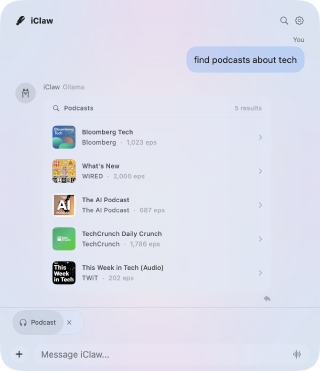
At present, iClaw is basically a bad Siri. Ask it for the weather, a stock quote, a Wikipedia summary, or some basic math. It uses Apple’s tools to read calendar events, search through email, transcribe a podcast, or translate a document. But iClaw (and general-purpose on-device AI) has some major limits today. Small models excel at executing a single, narrowly defined task, but they fail at task decomposition and “reading between the lines.” If you don’t spell out exactly what you want, on-device AI models are much more likely to make mistakes.
Some of iClaw’s key features include:
- Just-in-time Permissions. iClaw doesn’t use blanket permissions or policies. It lives in the App Sandbox and asks permission whenever it wants to read your Calendar or send an iMessage.
- Browser Bridge. iClaw can read and interact with Safari, Chrome, or Firefox through a Web Extension.
- Dynamic Widgets. iClaw creates on-the-fly widgets using it’s own DSL, so you don’t have to read a wall of text.
What’s exciting is what iClaw could do with an updated model and an improved harness.
What could iClaw do? #
iClaw suffers because it tries to augment a constrained model (Apple’s 3B Foundation Model) with natural language processing (NLP) and machine learning (ML) classifiers. As a task gets more complex, or the number of tools expands, the model gets distracted, makes mistakes, or outright refuses to do anything!
In building iClaw, I’ve explored lots of applications and integration surfaces. Of the many ideas I had for iClaw, a few still hold promise.
- Personalized Email Triage: use MailKit and Apple Intelligence to privately and securely triage, tag, filter, forward, and delete incoming emails
- Mac-iPhone Continuity: use Apple Intelligence and iCloud Sync to search your MacBook’s files via Spotlight on the go from your iPhone
- Automate Everything: use Apple Intelligence to author custom AppleScript automation for transcription, conversion, batch image editing, and more
- Background Browsing: natively bridge a Safari Extension to Apple Intelligence so AI can browse real estate listings, classifieds, and social media on your behalf
- Learned Skills: Skills written in Markdown are simple, but not intuitive for the average user. A better approach would be to “learn” common tasks and codify them into Skills
Apple itself may be exploring similar applications, with rumors of “Campos”, an AI-powered Siri chatbot with access to Photos, Mail, Messages, and more.
Why On-Device? #
Local models aren’t just about privacy — they’re about business strategy, unit economics, and experiments that indicate venture capital subsidies are ending. It will always be more cost-effective in the long run to use the compute you already have, rather than lease it from someone else.
Local Tradeoffs #
There’s no such thing as a free lunch. Apple’s 3B Foundation Model is arguably one of the worst contenders for an on-device agent. It’s terrible at following instructions, has a minuscule 4,096-token context window, doesn’t offer a native thinking mode, has aggressive safety guardrails, and can be extremely flakey. Then there are concerns related to how AI affects battery life, uses tons of memory, and serves inference sequentially (so your app might have to wait its turn). Despite these shortcomings, Apple Intelligence can still be quite useful for tasks like summarization, redaction, pattern matching, and search augmentation.
What about other models? #
My laptop is a 24GB M4 MacBook Air, which by most standards is fairly capable. Yet when it comes to local models, 24GB really limits what’s possible. iClaw natively supports Ollama, so you can bring-your-own-model (BYOM). I’ve tested quantized (Q4_K_M) versions of Gemma 4 E4B and Qwen3.5-4B. Both generally performed better than the AFM at routing, judging, and responding in a conversational way. However, both were noticeably slower and had a tendency to ramble. This is of course subjective and likely hardware-dependent, but for most macOS users, the fastest and most efficient on-device AI model is almost certainly Apple’s Foundation Models.
What I Learned #
1. Just a few tools #
Arguably it’s better to do one thing well, rather than many things poorly.
Tool calling is an important capability that allows AI models to access your files, contacts, messages, or the web. Early versions of iClaw actually worked well, but when our tool count ballooned from 4 to 14, we quickly realized that the AFM was basically calling tools at random, or not at all.
Small models like the Apple Foundation Model (AFM) get easily distracted, so if you’re building on Apple Intelligence it’s best to limit the model’s tool choice to just 2 or 3. A major challenge in AI is testability and reproducibility. If your app has fewer tools, fewer settings, and fewer features, there are fewer state combinations to worry about.
2. No context snowballs #
All AI models, including frontier models, get lost in the middle. On small models, context rot and bloat will completely derail an agent. OpenClaw has session pruning, OpenCode has a /compact command, and Claude can dream. These are all strategies for pruning context to keep it relevant and stay within context window limits.
For small models like the AFM, don’t let your context snowball. Instead, build scaffolding that keeps you well within the 4,096-token window and avoids the most devastating failure modes. iClaw ships with several text classifiers that act as tool routers.
Rather than ask the model which of 40+ tools to use, iClaw uses a small classifier that runs in milliseconds. This too can fail, but it will do so deterministically. Sometimes deterministic failure can be an advantage. Consider ShellTalk, a text-to-bash utility I built. Changes can be tested against hundreds of cases in minutes. If you can reliably measure accuracy, you can use a technique like Meta-Harness or Autoresearch to autonomously and continuously drive improvements.
3. Lower your expectations #

I had dozens of ideas for iClaw. One notable idea took inspiration from Agent-to-UI (A2UI): dynamically rendering widgets, rather than a wall of text. Early tests worked! The AFM could output a custom, token-efficient, XML-like domain-specific language (DSL) to render lists, tables, images, and chips. But it wasn’t long before the model started spitting out tables with strange layouts: duplicating headers, misaligning columns, or omitting key data.
My second approach involved training a custom adapter and pre-generating templates for a slot-fill strategy. This worked better in that it prevented the most egregious failure modes, but it was still far from consistent.
My advice: lower your expectations. On-device AI will make more mistakes, so give it fewer tasks to mess up. For now, this is the price you pay when your cost per million tokens is $0.
4. Other lessons #
Nested choices #
Replace flat lists–weather, calendar, messages, news–with clustered domains–media and communication. Nested and hierarchical choice enhances user experience by reducing mental load, and improves model performance by reducing tool selection errors. Local models have the benefit of zero network latency, so they are better suited at sequential tasks. Again, these models are hopeless if you give them 40 tools, but use a classifier to pick 1 of 8 domains, then ask the model to select when of the 3 tools in that domain to use.
Arithmetic and hallucinations #
AI models are still bad at math. Don’t ask the AFM to do arithmetic, format dates, or convert units — it will confidently get them really wrong. Instead, have tools return facts and let the LLM rephrase these into natural language. Emit LaTeX, timezone identifiers, and precisely-formatted numbers then verify the model’s output against the formatted inputs.
Don’t pollute the context #
One unhandled exception can pollute an entire context chain. If a tool returns an error, and that error gets passed as context into the next turn with the model, prompt outputs can go way off track. Catch errors, and either retry deterministically or ask the LLM to heal certain classes of errors. When it’s not possible, ask the LLM to phrase the error in a human-readable way. Error handling is definitely not a solved problem and LLMs offer an entirely new class of vulnerabilities and errors to deal with.
Rewind the tapes #
Ruby’s VCR library is still one of my favorites. Unit tests need to be reliable, repeatable, fast, and thorough in order to be informative. Like HTTP requests, LLM responses are non-deterministic. Consider running, storing, and replaying past responses so your unit tests are consistent.
Tactical advice #
The AFM does not have a lot of levers: no public weights to adjust, no thinking or reasoning modes, and no constrained grammar. What it does have, you should use:
- Limit response size (and lower response time) with
maximumResponseTokens - Make responses more predictable by adjusting the
temperature - Make diverse but constrained choices by setting the
samplingmode - Call
prewarmto reduce latency, cache a prompt prefix, and affect memory residency - Use
InstructionsBuilderto increase instruction compliance
The right prompt and appropriate settings can actually produce dramatic improvements!
What’s Next? #
iClaw is available for free with code on GitHub. I’ll be applying these lessons, and learning many more, as I continue building iClaw and local-first AI products. Stay tuned for more!